

If you read my March Sales Update you will know I put myself on a sourcing ban for the beginning of April. I had quite a few expenses last month so my net profit isn’t looking great.
You may be thinking, but Amy, you showed us last month how profitable it can be to consistently list new items, how are you going to up your profit without buying new inventory?
Store maintenance is your answer.
Luckily for you guys, I’ll embarrass myself and show you all the mistakes I made, so you don’t have to make the same ones.
This is my step by step guide on how to update your old listings to make them more desirable.
Step One – Find Your Oldest Listings.
This is where you want to start, you need to look at why these listings aren’t selling.
Some of my items have been listed since I first started in January of 2024. If you want to know how I track my listings to know which ones are the oldest I have a post on that here.
Here are just some examples of some of my oldest listings, can you tell what is wrong with them?
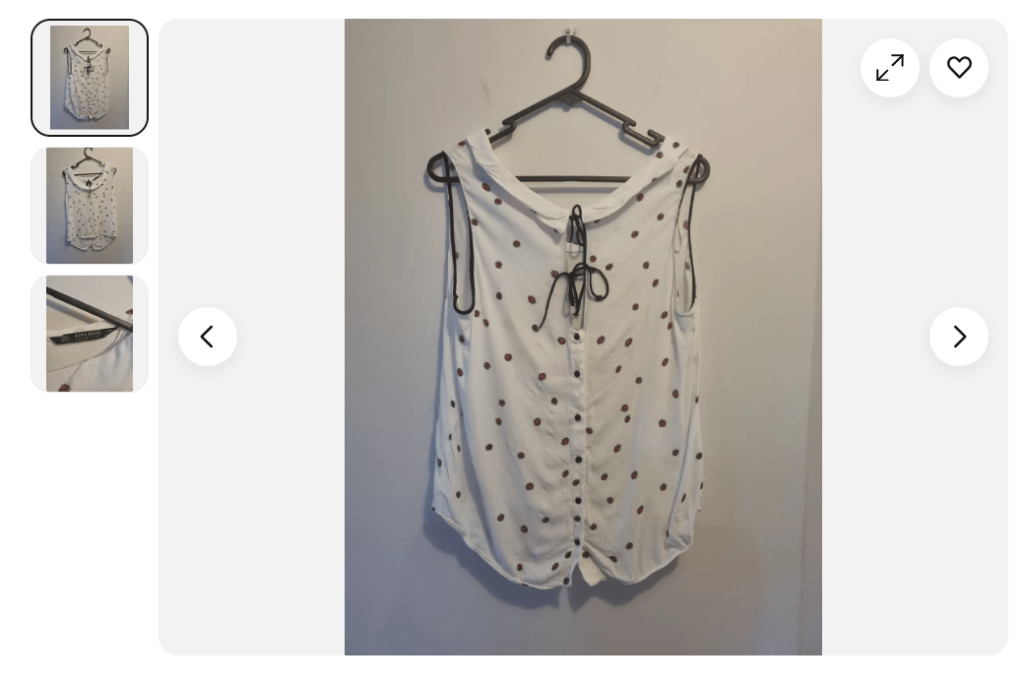


These are terrible. Not enough photos, bad lighting. The clothing is off centre and not having a white background. (There is some contention in the eBay community if a white background actually helps your sales, but I like it.) I think I found about 20 or so listings that needed new photos taken.
Step 2 – Go Back to your Research.
If you’re selling clothing, you need to know that fashion trends change pretty rapidly, something that was popular in January of 2024 will not still be sort after in April of 2025. So you need to be making sure your listing price reflects the market. I always check the sold prices on eBay as I like to see what keywords people are putting in their titles. The Product Research tab on eBay will give you the most accurate information on what brands are selling for what price.
Step 3 – Check your Titles.
This is similar to going back to your research, but you want your titles to reflect what people are currently searching for, and what is trending. At the moment Coquette clothing is super popular, so if you have anything in that style, add it to your titles. Office siren is also trending on TikTok, so start adding that to any of your business attire listings. You also need to make sure you have the brand and size at the beginning of the title. Your title and photos are the most important part of the listing, if the photos and title are bad, people are just going to scroll straight past.
Get Rid of that AI Description.
When I first started, I really struggled on what to write in the description and eBay had this little button that said “Let AI write your description” which I did. Here is an example of an AI description.

This tells you absolutely nothing about the item that wasn’t already in the item specifics or title. It pulls random buzzwords that has nothing to do with the item. Get rid of it, it just opens you up to an INAD claim, because why am I saying that these $10 joggers are sophisticated?
So this is my plan for April, hopefully you guys can learn from my mistakes.
Realistically, you should be doing store maintenance every 90 or so days. I left this way too long and is going to take me a while to sort, but hopefully this means I can move some of that old stock to make room for better quality items.

 Cashing In Online
Leave a reply to April Sales Update. – Cashing In Online Cancel reply